
The Flipper Zero AIO (All-In-One) v1.4 expansion board represents a significant upgrade for Flipper Zero enthusiasts looking to extend their device’s capabilities beyond basic RFID, NFC, and Sub-GHz functionality. This compact board integrates multiple wireless communication modules into a single package-Wi-Fi, 2.4GHz transceiver, enhanced Sub-GHz, and SD card storage-effectively turning your Flipper Zero into a powerful penetration testing and wireless analysis tool.
If you’ve recently acquired one of these boards (or plan to), protecting your investment becomes crucial. The exposed components and GPIO pins can be delicate-which is why at Ebarb Prints & Tech, we’re prototyping a custom 3D-printed case specifically designed for the AIO v1.4 board. But first, let’s cover everything you need to know about setup, firmware installation, and real-world use.
What Is the Flipper Zero AIO v1.4 Board?
The AIO v1.4 is a third-party expansion board designed specifically for the Flipper Zero. It plugs into the device’s GPIO header and provides access to several wireless communication protocols that aren’t natively supported by the base Flipper Zero.
Key Modules Included:
- ESP32-S2 WiFi module – Enables WiFi scanning, packet sniffing, and network analysis via Marauder firmware
- nRF24 2.4GHz transceiver – Enables NRF Mousejacker capability (2.4GHz proprietary protocol, not Bluetooth LE)
- Enhanced CC1101 Sub-GHz module – Higher-gain antenna for improved Sub-GHz range
- SD card slot – Saves captured network traffic (PCAP files) for later analysis
- High-gain antenna – Boosts signal reception for Sub-GHz and 2.4GHz bands
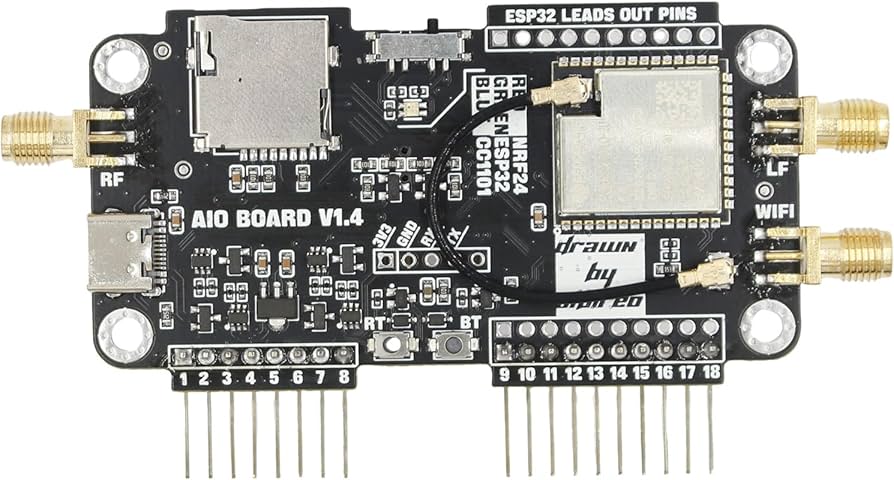
Think of it as a Swiss Army knife for wireless security testing-all in one compact board that attaches directly to your Flipper Zero.
Why Choose AIO v1.4 Over the Standard WiFi Dev Board?
If you’re familiar with the official Flipper Zero WiFi Dev Board (or similar ESP32-based boards), you might wonder why you’d choose the AIO v1.4 instead. Here’s the breakdown:
The Official WiFi Dev Board: One-Trick Pony
The standard WiFi Dev Board focuses on a single capability: WiFi scanning and analysis via Marauder firmware. It’s straightforward, reliable for WiFi work, and generally cheaper ($25-$35). But that’s all it does.
The AIO v1.4: All-In-One Powerhouse
The AIO v1.4 takes the concept further by bundling five additional modules into the same footprint:
- nRF24 2.4GHz transceiver – Enables NRF Mousejacker capability (2.4GHz proprietary protocol, not Bluetooth LE)
- Enhanced Sub-GHz with high-gain antenna – Better range and sensitivity for capturing garage door remotes, car key fobs, weather sensors, and other Sub-GHz signals
- MicroSD slot – Save captured WiFi traffic (PCAP files) directly to card for later analysis
- Function switch – Selects between different modules (cannot use all simultaneously)
- High-gain antenna – Boosts signal reception for Sub-GHz and 2.4GHz bands
Key Differentiators
| Factor | AIO v1.4 | Standard WiFi Dev Board |
|---|---|---|
| Functionality | WiFi + 2.4GHz transceiver + Sub-GHz + Mousejacking + SD storage | WiFi only |
| Antenna | High-gain CC1101 (Sub-GHz) + external WiFi antenna | Basic PCB antenna |
| Storage | On-board MicroSD slot | None |
| Use Cases | Full-spectrum wireless testing, multi-protocol research, field capture with logging | WiFi-only scanning and deauth |
| Complexity | Moderate setup, multiple modules to configure | Simple plug-and-play |
| Ideal User | Security researcher, developer, enthusiast wanting all-in-one capability | Casual user who only needs WiFi features |
When the AIO v1.4 Makes Sense
- You need 2.4GHz transceiver capability for mousejacking – For wireless mouse/keyboard injection testing (requires compatible targets)
- Better Sub-GHz performance matters – The high-gain antenna captures weaker or distant signals
- You want onboard storage – Saving PCAPs directly to SD card avoids laptop dependency
- You’re tired of swapping boards – One board handles WiFi, 2.4GHz transceiver, and Sub-GHz instead of three separate modules
- Future-proofing – Even if you only use WiFi today, having 2.4GHz transceiver/Sub-GHz on tap means you can expand later without buying more hardware
When to Stick with the Official Board
- Budget is primary concern – The official board is cheaper
- You only need WiFi – No point paying for unused Bluetooth/Sub-GHz hardware
- Maximum simplicity – Fewer components mean fewer potential points of failure
- Official support – The WiFi Dev Board is documented by Flipper team directly
Bottom line: If you’re serious about wireless security research or want a single board that does it all, the AIO v1.4 is the clear upgrade. If you just want basic WiFi scanning, the official board is simpler and cheaper.
Hardware Overview
The AIO v1.4 board features:
- Function switch – Toggles between different modules (cannot use all modules simultaneously – you must select the active module)
- Physical LED indicators – Red=2.4GHz active, Green=WiFi active, Blue=CC1101 (Sub-GHz) active
- BOOT button – Used for firmware flashing
- USB Type-C port – For firmware updates and power
- GPIO header – Connects directly to Flipper Zero’s pins
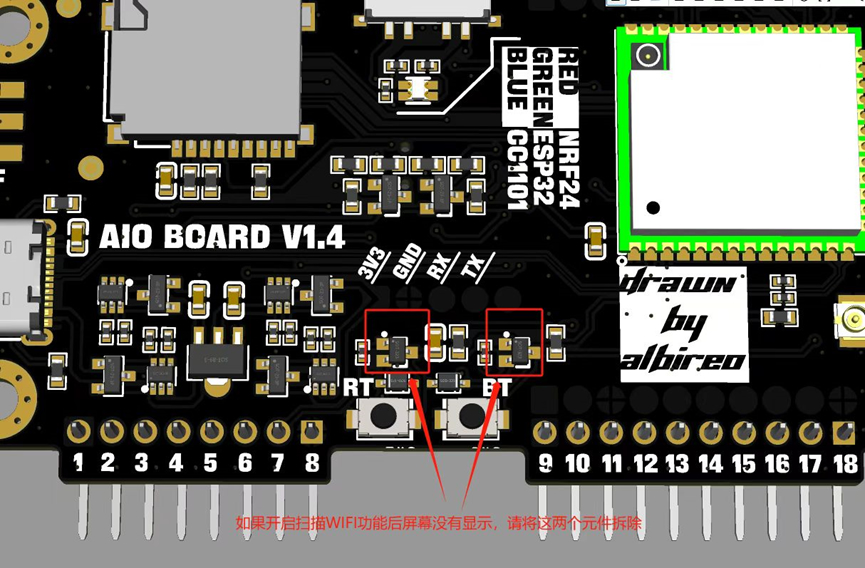
Important Note: There are multiple variations of “AIO” boards floating around AliExpress and other marketplaces. The v1.4 specifically refers to the version with the ESP32-S2 chipset (not the earlier ESP8266 version). Always verify your board’s markings.
Preparation: What You’ll Need
- Flipper Zero AIO v1.4 Board
- USB Type-C cable – For flashing firmware
- MicroSD card (optional but recommended) – For saving captured WiFi traffic
- Computer with modern browser (Edge or Chrome recommended)
- Custom firmware for Flipper Zero – Unleashed, Xtreme, or RogueMaster firmware with WiFi Marauder companion app
Step-by-Step Setup Guide
Step 1: Prepare Your Flipper Zero
Before connecting the AIO board, you’ll need to install custom firmware on your Flipper Zero that includes the WiFi Marauder companion app. The most popular options are:
- Unleashed Firmware – Well-maintained, community-focused
- Xtreme Firmware – Feature-rich with regular updates
- RogueMaster – Extensive plugin collection
All three include the WiFi Marauder app by default. Follow your chosen firmware’s installation guide to flash it to your Flipper Zero.
Step 2: Flash Marauder Firmware to the AIO Board
The AIO v1.4 runs Marauder firmware-a specialized WiFi attack/analysis suite originally developed for ESP32-based WiFi dev boards.
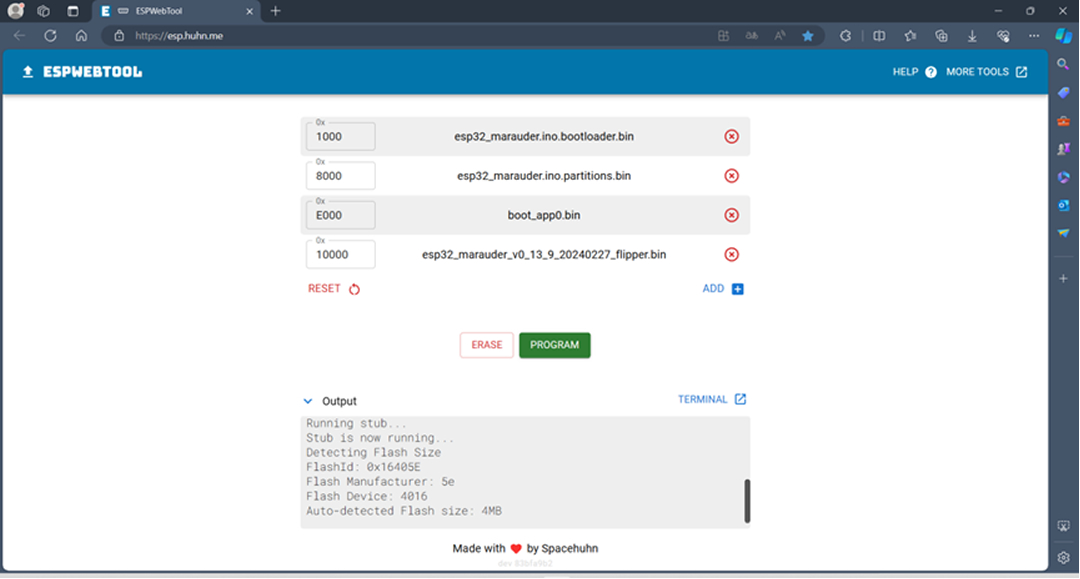
Using ESP Web Tool (Recommended):
- Set the function switch on the AIO board to the middle position
- Press and hold the BOOT button (labeled BT on some boards)
- While holding BOOT, connect the board to your computer via USB-C
- The green LED should illuminate
- Open ESP Web Tool in your browser
- Select ESP32-s2 as the chip type
- Upload the firmware files from the
firmware/latestdirectory in the SecureTechware repository - Click PROM to begin flashing
- Wait for progress to reach 100%
Alternative Methods:
- FZ Marauder Flasher – GUI-based flasher for Windows
- FZEasyMarauderFlash – Simplified flashing tool
- Build from source – For advanced users wanting latest features
Step 3: Connect and Configure
- Insert MicroSD card (if using) – Format as FAT32
- Connect AIO board to Flipper Zero – Align pins carefully with GPIO header
- Power on Flipper Zero – The board should draw power from the Flipper
- Launch WiFi Marauder app – Found in your Flipper’s applications menu
- Select COM port/baud rate – Usually defaults work fine
If everything is configured correctly, you should see the Marauder interface with options for scanning, sniffing, and various WiFi attacks.
Key Features and Capabilities
1. WiFi Scanning and Analysis
- Channel scanning – Monitor all 2.4GHz WiFi channels
- Packet sniffing – Capture and analyze WiFi traffic
- Beacon spam – Generate fake access points
- Deauth attacks – Force devices to disconnect (for testing purposes only!)
- Probe request logging – Track nearby devices searching for networks
2. 2.4GHz Transceiver with nRF24 (Mousejacking)
- Mousejacking – Wireless mouse/keyboard injection (requires compatible targets)
- 2.4GHz signal analysis – Study proprietary 2.4GHz protocols
- Device discovery – Scan for compatible 2.4GHz devices (not Bluetooth LE)
3. Enhanced Sub-GHz
- Improved range – Higher-gain antenna extends Sub-GHz capabilities
- Signal replay – Capture and retransmit Sub-GHz signals (garage doors, car keys, etc.)
- Signal analysis – Study modulation schemes and protocols
4. SD Card Logging
All captured WiFi traffic can be saved as PCAP files to the SD card for later analysis in tools like Wireshark.
Common Issues and Troubleshooting
No Power/No LED
- Check connections – Ensure board is firmly seated in GPIO header
- Verify Flipper battery – Board draws power from Flipper Zero
- Inspect for damage – Look for bent pins or loose components
Firmware Flash Fails
- Hold BOOT during connection – Essential for entering flash mode
- Switch in middle position – Required for ESP32-S2 flashing
- Try different USB cable – Some cables only charge, don’t transfer data
- Switch browsers – Some browsers have better WebUSB support
Slow WiFi Scanning
Some v1.4 boards may experience slow WiFi scanning due to certain components. The official installation guide suggests removing two specific components (requires soldering) to optimize performance. Refer to the board diagram in the SecureTechware repository for details.
No COM Port Detected
- Try different USB port – Some USB controllers work better than others
- Check drivers – ESP32-S2 may need CH340/CP210x drivers on Windows
- Restart everything – Sometimes a fresh start helps
Known Issues
- SD card compatibility – Some MicroSD cards experience recognition or write-speed issues. Use a known-good FAT32-formatted card from a reputable brand. If the board fails to detect the card, try a different card before assuming hardware failure.
- Firmware flashing difficulties – Flashing the ESP32-S2 can be finicky. If the ESP Web Tool fails to connect, ensure the function switch is in the correct position (middle), hold the BOOT button before plugging in USB, and try a different browser (Chrome or Edge recommended). Some users report needing to retry 2-3 times before success.
Practical Applications
For Security Researchers
- Network penetration testing – Identify vulnerable networks and devices
- Protocol analysis – Study WiFi and Bluetooth communication patterns
- Signal research – Analyze Sub-GHz protocols for security assessments
For Developers
- Wireless prototyping – Test custom wireless applications
- IoT device testing – Evaluate IoT device security
- Educational tool – Learn about wireless protocols hands-on
For Enthusiasts
- Signal capture and replay – Learn about RF signals in your environment
- Device compatibility testing – Check your own devices’ security
- Wireless experimentation – Explore the wireless spectrum safely
Comparison: AIO v1.4 vs. Official WiFi Dev Board
| Feature | AIO v1.4 | Official WiFi Dev Board |
|---|---|---|
| Wireless Modules | WiFi (ESP32-S2) + 2.4GHz transceiver (nRF24) + Sub-GHz (CC1101) + NRF Mousejacker | WiFi only (ESP32-S2) |
| Antenna | High-gain CC1101 for Sub-GHz, external WiFi antenna | Basic PCB antenna |
| Onboard Storage | MicroSD slot for PCAP logging | None |
| Price Range | ~$40-60 (Amazon/US); ~$25-40 (AliExpress) | ~$25-35 |
| Software Compatibility | Marauder firmware (same) | Marauder firmware |
| Setup Complexity | Moderate – requires function switch management, multiple module configuration | Simple plug-and-play |
| Primary Use Cases | Full-spectrum wireless testing, multi-protocol research, field capture with SD logging | WiFi-only scanning and deauth |
| Ideal User | Security researcher, developer, enthusiast wanting all-in-one capability | Casual user who only needs WiFi features |
| Future-Proofing | Built-in 2.4GHz transceiver and enhanced Sub-GHz ready for expansion | WiFi-only; needs separate boards for other protocols |
| Documentation | Community-driven (GitHub repos, Reddit threads) | Official Flipper team support |
Verdict: The AIO v1.4 is the clear choice if you need 2.4GHz transceiver capability, enhanced Sub-GHz range, onboard SD storage, or want to consolidate multiple capabilities into one board. It’s essentially three dev boards in one-WiFi, 2.4GHz transceiver, and Sub-GHz-plus extra features like mousejacking and high-gain antenna. The official WiFi Dev Board is better if your needs are strictly WiFi-focused, you prioritize simplicity, or budget is the primary constraint.
Advanced Configuration
SD Card Setup for PCAP Logging
If you want to save captured WiFi traffic:
- Solder a MicroSD breakout board to the AIO’s SPI pins:
- VCC → 3V3
- GND → GND
- DI (MOSI) → IO35
- DO (MISO) → IO37
- SCK → IO36
- CS → IO10
- Secure with double-sided tape
- Insert formatted FAT32 MicroSD card
- Configure Marauder to save to SD
External Antennas
For maximum range:
- WiFi: Replace stock antenna with RP-SMA external antenna
- Sub-GHz: Consider adding a telescopic or helical antenna
Protecting Your Investment: The Importance of a Proper Case
The Flipper Zero AIO v1.4 board represents a $40-$60 investment with delicate exposed components. When you’re carrying it in a bag, using it in the field, or even just storing it between projects, those GPIO pins, USB-C port, and surface-mounted components are vulnerable.
Common risks for an unprotected AIO board:
- Bent or broken pins – The GPIO pins can easily bend if mishandled
- Component damage – Exposed chips and resistors can be scratched or knocked off
- Dust and debris – Open PCBs attract dust that can cause connectivity issues
- Short circuits – Metal objects in a bag could bridge connections
Why a custom case matters:
At Ebarb Prints & Tech, we’re prototyping a purpose-built 3D-printed case specifically designed for the AIO v1.4. Unlike generic cases, ours:
- Snug fit – Prevents movement and protects GPIO pins during transport
- Component protection – Shields delicate chips and antenna connections
- Access port design – Maintains access to USB-C port and SD card slot
- Professional finish – Presents your gear as organized, protected hardware
Coming soon: We’re finalizing our custom AIO v1.4 case design. Join our mailing list at Ebarb Prints & Tech to be notified when it launches.
Safety and Legal Considerations
Important: The capabilities provided by the AIO board and Marauder firmware are powerful tools that must be used responsibly and legally.
- Only test networks and devices you own or have explicit permission to test
- Unauthorized network intrusion is illegal in most jurisdictions
- Deauth attacks can disrupt legitimate network operations
- Respect others’ privacy and property
These tools are designed for security research, education, and testing your own systems-not for malicious purposes.
Community Resources
- SecureTechware Repository – Official firmware and guides
- ESP32 Marauder Wiki – Comprehensive Marauder documentation
- Flipper Zero Discord – Active community support
- Reddit r/flipperzero – User experiences and troubleshooting
Reference Videos

Want to see the AIO v1.4 in action before you buy? These community videos walk you through setup, firmware installation, and real-world comparisons:
- Flipper Zero AIO v1.4 – Intro & Overview – Detailed introduction covering all modules, the function switch, and initial impressions
- AIO v1.4 Firmware Installation Guide – Step-by-step walkthrough of flashing Marauder firmware using ESP Web Tool
- AIO v1.4 Comparison Review – Head-to-head comparison of the AIO v1.4 against the official WiFi Dev Board and alternatives
Note: Video content is community-created and reflects user experiences. Individual results may vary depending on your board revision and firmware version.
Conclusion
The Flipper Zero AIO v1.4 expansion board transforms an already versatile device into a legitimate wireless security testing platform. While setup requires careful attention to firmware flashing and configuration, the payoff is access to WiFi analysis, 2.4GHz transceiver testing, and enhanced Sub-GHz capabilities-all in one compact package.
With careful handling and proper protection-like a dedicated case for the exposed components-the AIO v1.4 becomes a reliable tool for security researchers, developers, and wireless enthusiasts. Just remember: with great power comes great responsibility. Use these tools ethically, legally, and for constructive purposes.
Looking to protect your AIO v1.4 investment? We’re developing a custom 3D-printed case specifically designed for this board-snug fit, full component protection, and professional finish. Subscribe to our newsletter to be notified when it launches, and check our current collection of Flipper Zero accessories at Ebarb Prints & Tech.
About Ebarb Prints & Tech: We’re passionate about making cutting-edge technology accessible and protected. From custom 3D-printed cases to in-depth technical guides, we support the Flipper Zero community with both hardware solutions and educational content. Join our community of makers and security enthusiasts.


0 Comments